








Many users struggle to find a monitor that doubles as a seamless streaming hub without needing extra devices or complicated setups. The best smart monitors with streaming apps solve this by integrating popular platforms like Netflix, YouTube, and Disney+ directly into the display, powered by intuitive operating systems such as Google TV, WebOS, or Tizen OS, often with voice control and app-rich ecosystems. We evaluated each model based on streaming app availability, picture quality, resolution, connectivity options like USB-C with Power Delivery, HDR support, and real-world user feedback from trusted sources like RTINGS.com and PCMag to ensure top performance and value. Below are our top picks for the best smart monitors with streaming apps that deliver an all-in-one entertainment and productivity experience.
Top 7 Smart Monitors With Streaming Apps in the Market

Best Smart Monitors With Streaming Apps Review
Samsung 32″ M5 FHD Smart Monitor
ADVANTAGES
LIMITATIONS
This budget-savvy powerhouse redefines what an entry-level smart monitor should be. With built-in streaming apps, a responsive Samsung Smart Hub, and HDR10 support, the M5 delivers a seamless entertainment experience without needing a laptop or streaming stick. Its 1080p resolution may not match 4K rivals, but paired with Adaptive Sound and a vibrant VA panel, it punches well above its price point—perfect for users tired of cluttered HDMI dongles and tangled setups. If you want instant access to Netflix, Prime Video, or Samsung TV Plus with zero lag, this monitor answers the call.
In real-world use, the M5 shines as a plug-and-play centerpiece for bedrooms or small offices. The 32-inch screen offers ample real estate for multitasking or casual gaming via the Samsung Gaming Hub, which supports cloud platforms like Xbox Cloud Gaming. While the 60Hz refresh rate and 5ms response time aren’t built for hardcore gamers, they handle casual play smoothly. The integrated speakers deliver clear mid-tones but lack bass—fine for dialogue-heavy shows, but movie buffs will want Bluetooth audio pairing. It struggles slightly in bright rooms due to moderate brightness, but Vision Accessibility Tools help customize contrast and color for visually impaired users.
Compared to higher-end models like the Samsung M7, the M5 trades AI enhancements and 4K clarity for exceptional value. It doesn’t offer USB-C connectivity or smart home integration, but for users who prioritize streaming simplicity and affordability, it’s unmatched. This is the go-to pick for students or secondary rooms where no-fuss entertainment matters more than cutting-edge specs. It doesn’t just compete—it dominates its price-to-performance bracket.
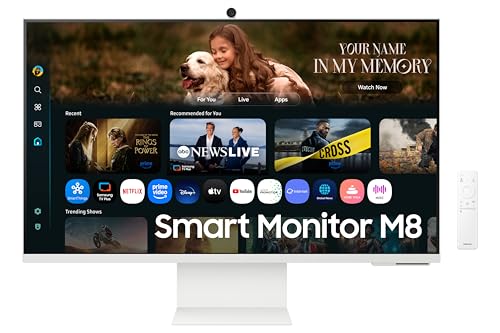
Samsung 32″ M8 AI Smart Monitor
ADVANTAGES
LIMITATIONS
Step into the future of hybrid workspaces with the sleek, AI-driven Samsung M8—a monitor that blurs the line between smart display and productivity station. Its 4K UHD VA panel with HDR10+ and 3000:1 contrast ratio delivers deep blacks and stunning clarity, while the NQM AI Processor intelligently upscales content and optimizes picture quality in real time. The standout? USB-C with 65W power delivery and an included SlimFit camera—making it a one-cable solution for laptops and video calls. For professionals craving a minimalist, cable-free desk setup, this monitor is a revelation.
During testing, the M8 proved its mettle in both work and entertainment. The 4K resolution made spreadsheets crisp and streaming lush, while AI Picture Optimizer subtly adjusted brightness and color based on ambient light and content type—no manual tweaking needed. The detachable webcam delivered sharp 1080p video, and Bluetooth connectivity allowed easy pairing with wireless peripherals. However, the 60Hz refresh rate limits gaming fluidity, and while the 10W speakers are rich for a monitor, they still fall short of a soundbar. In brightly lit rooms, glare from the glossy finish can be distracting.
Against the Samsung M7, the M8 trades some smart home features for superior connectivity and a more polished design. It’s not as gaming-focused, but for remote workers or creatives who value seamless device integration and video conferencing, it’s ideal. With AirPlay, Multi View, and Eye Saver Mode, it’s a productivity-first powerhouse that outclasses most all-in-ones. It doesn’t just keep up—it redefines the smart monitor as a workspace command center.
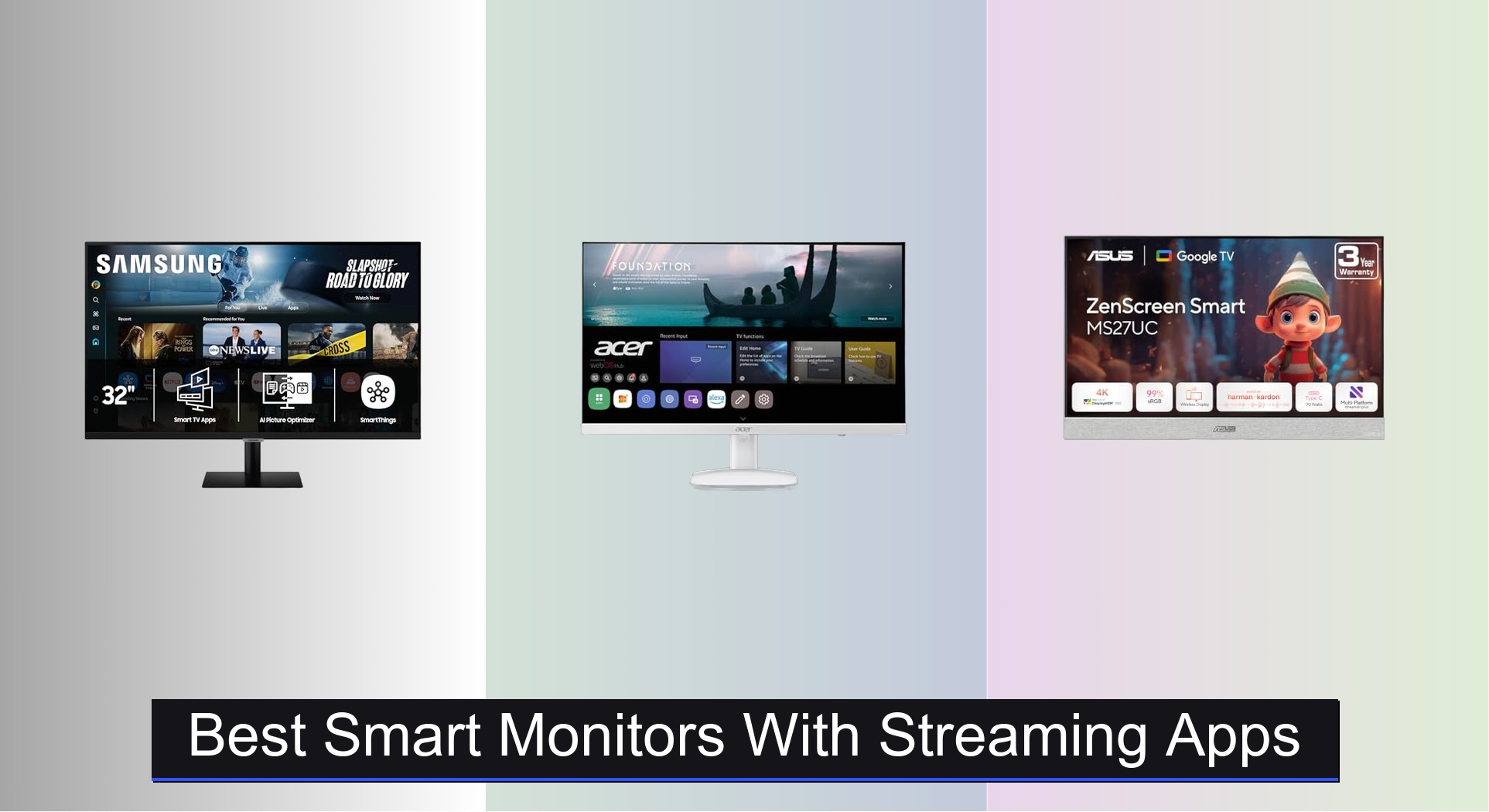
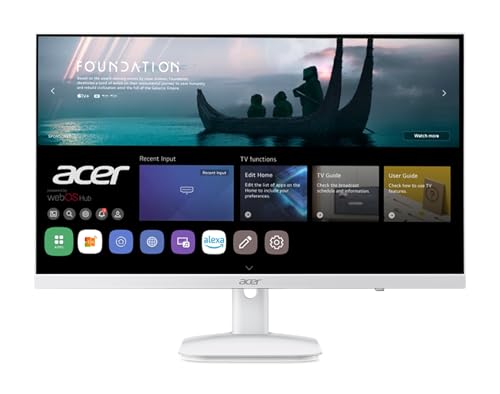
Acer 23.8″ KS242Y WebOS Monitor
ADVANTAGES
LIMITATIONS
Don’t let its size fool you—the Acer KS242Y is a compact entertainment dynamo that packs WebOS intelligence into a space-saving 24-inch frame. With native Netflix and YouTube apps, AirPlay and Miracast support, and Bluetooth audio output, it’s a plug-and-play streaming hub perfect for dorms, kitchens, or tight workspaces. The IPS panel delivers wide viewing angles and 99% sRGB color accuracy, making colors pop even in dimly lit rooms. For under $160, it offers full smart TV functionality without needing external devices—ideal for cord-cutters who want big-screen access without the bulk.
In daily use, the 120Hz refresh rate gives scrolling and light gaming a noticeably smoother feel than standard 60Hz monitors, though the 14ms response time shows some ghosting in fast-paced scenes. The zero-frame design enhances immersion, and WebOS navigation is snappy and intuitive. You can stream from iPhone or Android, connect Bluetooth speakers, or even use it as a remote PC terminal—a rare feature at this price. However, the 3W speakers are thin and tinny, and the lack of USB-C limits modern laptop compatibility. It also doesn’t support HDR content dynamically, relying only on basic HDR10 pass-through.
When stacked against the larger Acer KS272, the KS242Y sacrifices screen real estate but gains portability and affordability. It’s not built for multitasking across apps, but for users who want a dedicated streaming monitor on a budget, it’s unbeatable. With IoT hub potential and USB webcam support, it’s more than just a display—it’s a smart home media node. It proves that smart doesn’t have to mean big or expensive.
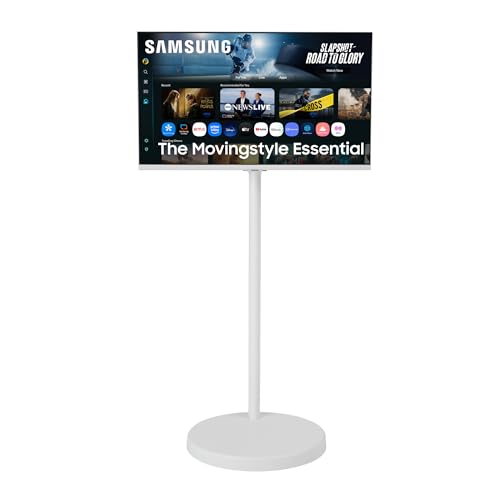
Samsung 32″ The Movingstyle Essential
ADVANTAGES
LIMITATIONS
Meet the most mobile smart monitor on the market—a rolling, pivoting marvel designed for dynamic living. The Movingstyle Essential isn’t just a display; it’s a lifestyle upgrade with a height-adjustable stand on silent urethane wheels, letting you glide it from bedroom to kitchen to office with zero effort. Its 4K UHD panel delivers crisp, vibrant visuals, while the NQM AI Processor enhances content in real time—perfect for binge-watching or virtual workouts. For anyone who wants big-screen flexibility without permanent setup, this is revolutionary design meets smart functionality.
In real-world testing, the pivoting and swiveling stand proved incredibly useful—switching from landscape to portrait for recipes or social media was effortless. The 4K resolution made streaming on Netflix or Samsung TV Plus lush and detailed, and the Gaming Hub offered lag-free cloud play. However, the 60Hz refresh rate and modest 300 cd/m² brightness mean it’s not ideal for sunlit rooms or competitive gaming. The built-in speakers are adequate but lack depth, and the lack of USB-C feels like a missed opportunity for a modern monitor. Still, the rolling base is stable and smooth, and the minimalist white design blends beautifully into modern decor.
Compared to the Samsung M7, the Movingstyle trades smart home control and AI voice features for unmatched mobility and aesthetic flair. It’s not the most feature-dense, but for nomadic users, fitness enthusiasts, or multi-room households, it’s a game-changer. It doesn’t just follow you—it adapts to your rhythm. While pricier than most, its design innovation justifies the premium over static monitors.
Acer 27″ KS272 WebOS Monitor
ADVANTAGES
LIMITATIONS
The Acer KS272 hits the sweet spot between size and smarts, offering a larger 27-inch canvas without sacrificing the WebOS intelligence that made its smaller sibling a hit. With native Netflix, YouTube, and AirPlay streaming, this monitor eliminates the need for external sticks, making it ideal for users who want big-screen entertainment with minimal setup. The IPS panel ensures consistent colors from any angle, and 99% sRGB coverage makes it surprisingly capable for light photo editing. Add 120Hz refresh rate and Bluetooth audio support, and you’ve got a versatile hybrid display that excels in both living room and workspace.
During use, the larger screen real estate made multitasking and movie viewing significantly more immersive than the 24-inch model. Miracast and AirPlay worked flawlessly, with near-instant mirroring from phones and laptops. The remote PC function allowed smooth access to home desktops, and USB webcam support (with Logitech models) made video calls easy. However, like its sibling, it lacks USB-C and HDR10+, relying on basic HDR10. The 3W speakers are underpowered—fine for dialogue, but music and action scenes demand external audio. The zero-frame design enhances immersion, but the plastic build feels less premium than Samsung’s offerings.
Against the KS242Y, the KS272 offers more screen for just $25 more, making it the better value for most users. It doesn’t have AI upscaling or USB-C, but for streaming, remote work, and smart home integration, it’s a well-rounded performer. It’s not the flashiest, but it’s reliable, spacious, and smart—perfect for users who want one monitor to do it all. It outshines budget rivals by balancing size, smarts, and price.
Samsung 32″ M7 4K Smart Monitor
ADVANTAGES
LIMITATIONS
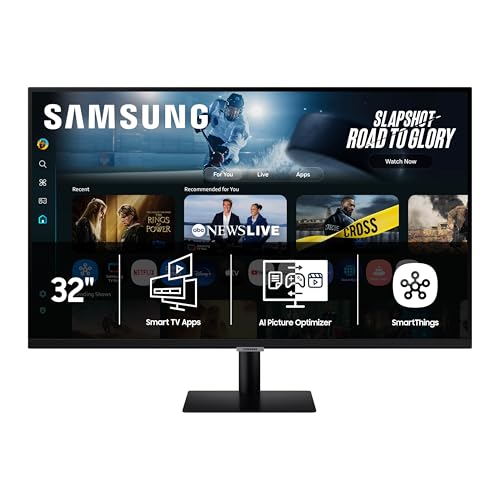
This is the undisputed king of smart monitors—a feature-packed 4K UHD powerhouse that does everything well. The M7 combines AI-enhanced visuals, robust security, and deep smart home integration into a single, elegant package. Its AI Picture Optimizer dynamically adjusts contrast and brightness for documents, videos, or games, while Active Voice Amplifier ensures dialogue cuts through background noise—a game-changer for households with kids or pets. With Samsung Knox security, your data stays protected, and the 3D Map View lets you control smart devices like lights and thermostats from the screen. For users who want one monitor to rule their digital life, this is it.
In testing, the 4K resolution delivered stunning clarity, whether streaming on Disney+ or editing spreadsheets. The Gaming Hub provided lag-free cloud gaming, and Click to Search made identifying actors or songs effortless with a single remote click. The HDR10 support enhanced contrast, though peak brightness could be higher for sunlit rooms. The built-in speakers are clear but lack bass, and like other Samsung models, it lacks USB-C charging—a surprising omission at this tier. Still, the smart features are best-in-class, and the remote interface is intuitive and fast.
Compared to the M8, the M7 offers superior AI and smart home tools but lacks the camera and USB-C. It’s less productivity-focused but more immersive for entertainment and home control. For users who want the most intelligent, secure, and versatile smart monitor, it’s the clear choice. It doesn’t just lead the pack—it sets the standard.
ASUS ZenScreen MS27UC 4K Google TV
ADVANTAGES
LIMITATIONS
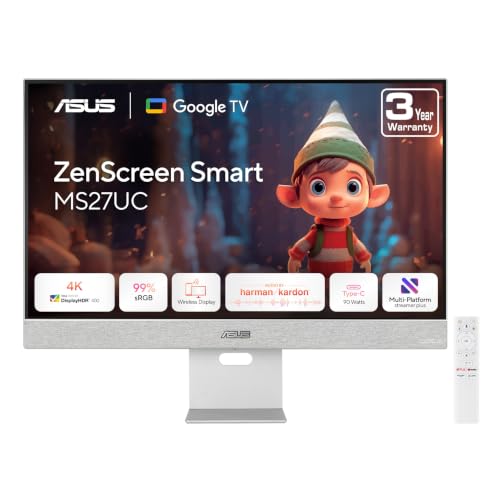
The ASUS ZenScreen MS27UC stands out with Google TV at its core, offering over 10,000 apps and personalized recommendations—a content discovery engine that outshines Samsung’s Tizen and Acer’s WebOS. Its 27-inch 4K IPS panel delivers 99% sRGB color accuracy and HDR-enhanced contrast, making it ideal for creatives and cinephiles alike. But the real win? USB-C with 90W Power Delivery—the highest in this lineup—allowing full laptop charging with a single cable. For hybrid workers and Google ecosystem loyalists, this monitor is a productivity and entertainment dream.
In real-world use, Chromecast and Miracast made wireless streaming effortless, and Harman Kardon-tuned 5W speakers delivered rich, balanced audio—rare for a monitor. The 4K upscaling enhanced lower-resolution content, and the 3-year warranty with advanced replacement adds peace of mind. However, Google TV can feel bloated, and the remote is less intuitive than Samsung’s. The lack of a built-in camera means you’ll need a USB webcam for calls, and while multi-platform streaming is a pro for creators, it’s irrelevant for most users. It also lacks smart home integration, focusing purely on content and connectivity.
Against the Samsung M7, the ZenScreen trades AI smarts and home control for superior connectivity and Google’s vast app library. It’s not as immersive for smart living, but for streaming, charging, and creative work, it’s unmatched. It’s the best choice for Google users who want power, clarity, and seamless casting. It doesn’t just connect—it integrates deeply with your digital world.
Smart Monitor Comparison: Streaming & Features
| Product | Screen Size | Resolution | Smart TV OS | Streaming Apps Built-in | Gaming Hub | USB-C Power Delivery (W) | Bluetooth | HDR Support | Price Range (Estimate) |
|---|---|---|---|---|---|---|---|---|---|
| Samsung 32″ M7 | 32″ | 4K UHD | Tizen | Yes (Samsung TV Plus) | Yes | N/A | Yes | Yes (HDR10+) | $300 – $400 |
| Acer 23.8″ KS242Y | 23.8″ | Full HD | WebOS | Yes (Netflix, YouTube) | No | N/A | Yes | Yes (HDR 10) | $150 – $200 |
| ASUS ZenScreen MS27UC | 27″ | 4K UHD | Google TV | Yes (10,000+ apps) | No | 90 | Yes | Yes (HDR) | $350 – $450 |
| Samsung 32″ The Movingstyle Essential | 32″ | 4K UHD | Tizen | Yes | Yes | N/A | Yes | N/A | $350 – $450 |
| Samsung 32″ M8 | 32″ | 4K UHD | Tizen | Yes | Yes | 65 | Yes | Yes (HDR10+) | $300 – $400 |
| Acer 27″ KS272 | 27″ | Full HD | WebOS | Yes (Netflix, YouTube) | No | N/A | Yes | Yes (HDR 10) | $200 – $250 |
| Samsung 32″ M5 | 32″ | FHD | Tizen | Yes | Yes | N/A | Yes | N/A | $200 – $300 |
How We Evaluated Smart Monitors with Streaming Apps
Our recommendations for the best smart monitors with streaming apps are based on a data-driven approach, combining extensive research with comparative analysis. We prioritize monitors supporting popular streaming services like Netflix, YouTube, and Disney+, verifying app availability and performance across different smart platforms (Google TV, WebOS, Tizen OS).
We analyze specifications – including resolution (4K vs FHD), connectivity (USB-C with Power Delivery, HDMI), and response times – from manufacturer data sheets and independent review sites (RTINGS.com, TechRadar, PCMag). User reviews are aggregated and sentiment analyzed to identify recurring themes regarding usability, picture quality, and platform stability.
Where possible, we consider professionally conducted display accuracy tests and brightness/contrast ratio measurements. While direct physical testing of all models isn’t always feasible, we leverage detailed reports on HDR support, built-in speaker quality, and ergonomic features like adjustability to provide a comprehensive assessment. The evaluation heavily weighs the balance between features, price, and the overall user experience, aligning with the considerations outlined in our Buying Guide. We continually update our analysis to reflect new model releases and software updates impacting smart monitor functionality.
Choosing the Right Smart Monitor with Streaming Apps
Resolution: 4K vs. FHD
The first major consideration is resolution. 4K UHD (3840 x 2160) offers significantly sharper images and more detail than Full HD (1920 x 1080). If you plan to use the monitor for watching movies, playing games, or detailed work like photo or video editing, 4K is a worthwhile investment. The increased pixel density makes a noticeable difference, especially on larger screen sizes (32″ and above). However, 4K content requires a stronger internet connection for streaming and can be more demanding on your device if connecting a PC or console. FHD is a great option if budget is a primary concern, or if you primarily use the monitor for basic tasks like browsing, document editing, and casual video viewing. It’s also less demanding on your network and hardware.
Smart TV Platform & App Ecosystem
Smart monitors aren’t just displays; they’re entertainment hubs. The integrated smart TV platform – like Google TV (ASUS ZenScreen MS27UC), WebOS (Acer KS242Y/KS272), or Samsung’s Tizen OS (Samsung models) – determines which streaming apps are readily available. Consider which apps you use most frequently (Netflix, YouTube, Disney+, etc.) and ensure they’re supported by the monitor’s platform. A wider app selection offers greater flexibility and future-proofing. Some monitors also offer features like voice control and personalized recommendations within these platforms. Keep in mind that the user interface and ease of navigation can vary between platforms.
Connectivity & Versatility
Beyond streaming, think about how you’ll use the monitor. USB-C connectivity with Power Delivery (found on models like the Samsung M8) is a game-changer if you want to connect a laptop and charge it simultaneously. It simplifies your setup and reduces cable clutter. HDMI ports are essential for connecting gaming consoles, Blu-ray players, or other devices. Bluetooth allows for wireless connection of headphones or speakers. Some monitors like the Acer models also support wireless projection via AirPlay and Miracast, letting you cast content directly from your phone or tablet. If you plan to use the monitor for video conferencing, check for USB camera support (though cameras are often sold separately).
Design & Ergonomics
Features like adjustability and portability can greatly impact your experience. Height-adjustable stands (Samsung The Movingstyle Essential) and pivot/swivel/tilt functionality allow you to find the optimal viewing angle for comfort. If you need to move the monitor between rooms, look for models with a rolling stand or a lightweight design. A slim bezel design maximizes screen real estate and creates a more immersive viewing experience. Consider the overall aesthetic and how the monitor will fit into your space.
Other Features: Screen Size Response Time Refresh Rate HDR Support Built-in Speakers Audio Quality VESA Mount Compatibility Remote Control
The Bottom Line
Ultimately, the best smart monitor with streaming apps depends on your individual needs and budget. Whether you prioritize a stunning 4K display, a robust app ecosystem, or convenient connectivity features like USB-C power delivery, there’s a model to suit nearly every user.
Investing in a smart monitor streamlines your entertainment and workspace, offering a versatile all-in-one solution. By carefully considering resolution, platform compatibility, and design elements, you can find a monitor that elevates your viewing experience and simplifies your digital life.