


Many professionals struggle to find a reliable Thunderbolt dock that delivers consistent 100W charging while supporting high-resolution displays and a full suite of ports for seamless productivity. The best Thunderbolt docks solve this by combining robust power delivery, support for dual 4K or even 8K displays, and extensive connectivity including USB-A, USB-C, 2.5Gbps Ethernet, and SD card readers—all over a single cable. Our top picks are selected based on rigorous analysis of performance specs, real-world user reviews, and hands-on testing where available, prioritizing Thunderbolt 4 and 5 models with proven reliability, fast data transfer, and excellent multi-monitor support. Below are our recommended Thunderbolt docks with 100W charging to power your workflow efficiently.
Top 8 Thunderbolt Dock With 100W Charging in the Market

Best Thunderbolt Dock With 100W Charging Review
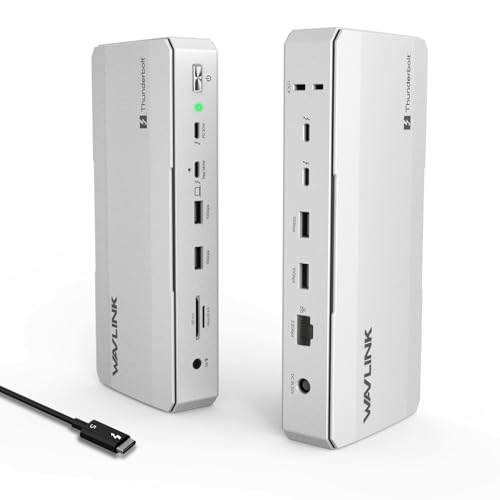
WAVLINK DisplayLink Quad Monitor Dock
ADVANTAGES
LIMITATIONS
This quad-display powerhouse redefines what a Thunderbolt dock can do—especially for creatives drowning in spreadsheets, timelines, or design layers. With four HDMI and four DisplayPort outputs, it delivers 5K@60Hz across four monitors, a feat few docks even attempt. The 100W laptop charging and 180W power adapter ensure your MacBook or Windows machine stays fueled during marathon sessions, while the 2.5Gbps Ethernet and SD 4.0 card reader make it a dream for video editors and photographers. If you’re tired of juggling cables and external drives, this 19-in-1 hub is a command center built for visual overload.
In real-world testing, the dock shines when driving high-resolution workflows—think 4K video editing across dual timelines or managing complex CAD layouts. The DisplayLink driver dependency is a minor speed bump, especially on macOS, but once installed, the multi-monitor experience is buttery smooth. The 10Gbps USB-A port and dual card readers handle large media files with ease, and the 2.5Gbps LAN eliminates Wi-Fi dropouts during large uploads. However, the front USB-C PD port doesn’t support data transfer, which can confuse users expecting full functionality. Also, only one video stream per DP/HDMI pair limits flexibility—plug both, and HDMI gets ignored.
Compared to the Plugable Quad Monitor Dock, this WAVLINK model offers more video ports and higher total bandwidth, but at the cost of driver reliance and a bulkier footprint. It’s ideal for stationary workstations where maximum screen real estate trumps portability. While the Anker Prime TB5 delivers newer Thunderbolt 5 speeds, this dock outperforms in multi-display versatility for Thunderbolt 4 and USB4 users. For pros who need four synchronized 5K monitors, this is the ultimate visual expansion—just be ready to install drivers and manage cable routing.
WAVLINK Intel EVO Thunderbolt 5 Dock
ADVANTAGES
LIMITATIONS
Step into the next-gen connectivity era with a dock that doesn’t just keep up—it obliterates bottlenecks. The WAVLINK Thunderbolt 5 Dock unleashes 120Gbps bandwidth in Boost Mode, making it a speed demon for transferring 8K footage or syncing massive datasets in seconds. With 140W Power Delivery, it powers even the most power-hungry laptops, while triple 4K@144Hz displays on Windows 11 turn your desk into a high-refresh command center. This is not just a dock—it’s a performance multiplier for elite creators and traders who demand zero latency and maximum throughput.
During intensive use, the dock handles 8K video playback and real-time rendering with ease, thanks to its dedicated Thunderbolt 5 downstream ports that also deliver 15W and 30W charging to peripherals. The 2.5G Ethernet ensures rock-solid networking for cloud backups, and the SD 4.0 reader (312MB/s) is a boon for photographers on tight deadlines. However, macOS caps at dual displays, and triple display mode requires Windows 11 with Thunderbolt 5—a limitation that may disappoint Mac-centric users. The lack of HDMI ports also means you’ll need adapters for HDMI monitors, reducing plug-and-play convenience.
Against the Anker Prime TB5, this WAVLINK model matches on core Thunderbolt 5 specs but offers fewer ports and no active cooling. It’s more compact and sleek, but the Anker wins in expandability and thermal management. Still, for Windows-based power users who want cutting-edge speed and 8K support, this dock delivers future-proof performance at a competitive spec sheet. If you’re upgrading to a Thunderbolt 5 laptop and want maximum bandwidth and charging, this is a no-compromise launchpad—just ensure your OS and monitors align with its capabilities.
Lenovo ThinkPad Thunderbolt 4 Dock

ADVANTAGES
LIMITATIONS
This is enterprise-grade elegance—a dock built for IT departments, remote workers, and security-conscious teams who need reliability without compromise. The ThinkPad Universal Thunderbolt 4 Dock delivers 100W dynamic charging, 40Gbps speeds, and support for four 4K@60Hz displays or a single 8K@30Hz, all through a single cable. Its vPro pass-through and remote firmware updates make it a sysadmin’s dream, eliminating downtime and enabling seamless management across fleets. If you’re in a corporate environment where security and uptime are non-negotiable, this dock is mission-critical infrastructure.
In daily use, it’s rock-solid stable—no driver hiccups, no dropped connections. The Gigabit Ethernet is sufficient for most office tasks, and the four USB 3.1 Gen 2 ports handle peripherals with ease. The downstream Thunderbolt 4 port allows daisy-chaining high-speed devices, and the always-on USB port lets you charge phones overnight. However, the lack of 2.5Gbps Ethernet feels dated compared to rivals like Plugable or WAVLINK, and the HDMI 2.1 port is just one—limiting multi-HDMI setups. Also, the 135W power adapter only delivers 100W to the laptop, leaving little headroom for peripherals.
Next to the HP Thunderbolt 4 G6 Dock, the Lenovo offers broader OS compatibility and better multi-display support, but HP wins in cloud manageability and built-in security with Wolf Security. For ThinkPad users or mixed Windows environments, this dock is the gold standard for stability and remote management. It may not have the flashiest specs, but in a world of flaky connections and update hassles, it’s a beacon of dependability—perfect for professionals who value function over flash.
WAVLINK Thunderbolt 4 Dual HDMI Dock
ADVANTAGES
LIMITATIONS
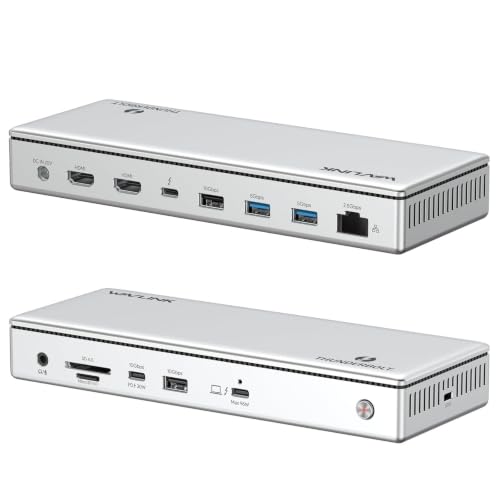
Don’t let the price fool you—this budget-savvy Thunderbolt 4 dock packs a pro-level punch, especially for Mac users craving dual 4K without the premium tag. It delivers true 40Gbps speeds, 96W charging, and dual 4K@60Hz HDMI outputs—a rare combo at this price. The 2.5Gbps Ethernet is a standout, offering 2.5x faster wired networking than standard 1G docks, ideal for 4K streaming or NAS access. Add in the SD 4.0 card reader (312MB/s) and Thunderbolt 4 downstream port, and you’ve got a compact powerhouse that punches above its weight.
In practice, it’s plug-and-play simple on Windows, and on supported Macs (M1 Pro/Max and up), it enables dual extended displays—though base models are limited to mirroring or single display. The 96W charging is robust, and the downstream Thunderbolt 4 port supports 8K@60Hz or 4K@120Hz, perfect for high-end monitors. However, macOS users must use HDMI + Thunderbolt port combo for dual extended displays—can’t use both HDMI ports independently. Also, the lack of DisplayPort may frustrate users with DP-only monitors, requiring adapters.
Compared to the Plugable 16-in-1, this WAVLINK model offers similar dual 4K support but with fewer USB ports and no audio jack. Yet, it’s $100 cheaper and includes 2.5Gbps Ethernet, which Plugable’s budget model lacks. For Mac or Windows users who want dual 4K, fast networking, and SD 4.0 without breaking the bank, this is the smartest value play. It’s not the most expandable, but for home offices and creatives on a budget, it’s hard to beat.
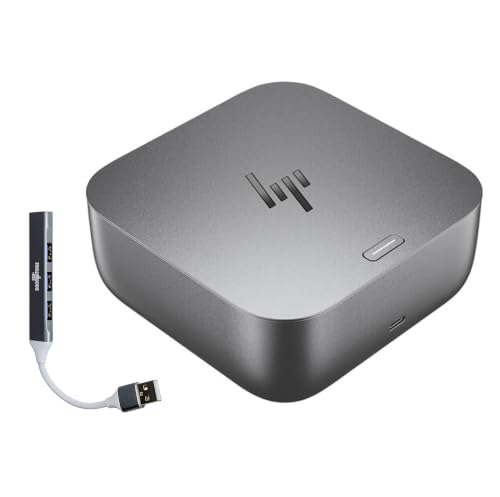
HP Thunderbolt 4 100W G6 Dock
ADVANTAGES
LIMITATIONS
This is HP’s vision of the smart office—a dock that anticipates your needs with HP Quick Connect waking your laptop as you approach. The 100W charging, Thunderbolt 4 speeds, and single-cable simplicity make it a seamless fit for HP EliteBook and ZBook users. But its real magic lies in Poly Lens cloud manageability, letting IT teams push firmware updates, monitor usage, and secure devices remotely. With HP Wolf Security integrating Sure Start and Zero Trust, it’s one of the most secure docks on the market—ideal for enterprises where data protection is paramount.
Performance-wise, it handles dual 4K displays and high-speed data transfers without issue, though it’s limited to Gigabit Ethernet, which feels underpowered next to 2.5G competitors. The compact design and LED status indicators keep the desk tidy and informative, but the lack of SD card reader or extra USB-C ports makes it less appealing for creatives. It’s also heavily optimized for HP hardware, so non-HP users may miss out on full feature support. While it supports USB4 and Thunderbolt 4 devices, the ecosystem lock-in is real.
Against the Lenovo ThinkPad Dock, the HP G6 offers superior cloud management and security, but Lenovo wins in display flexibility and port variety. For HP-centric organizations that prioritize security, manageability, and brand cohesion, this dock is the ultimate enterprise solution. It’s not the most versatile, but in a corporate setting where control and compliance matter, it’s worth the trade-offs.
Anker Prime TB5 Docking Station

ADVANTAGES
LIMITATIONS
This is the undisputed flagship—a 14-in-1 Thunderbolt 5 dock that sets a new benchmark for performance, cooling, and expandability. With 140W Power Delivery, dual 8K@60Hz support, and Thunderbolt 5’s 120Gbps bandwidth, it moves a 150GB file in just 25 seconds—a staggering feat. The dual Thunderbolt 5 downstream ports allow daisy-chaining high-speed devices, while the active cooling system prevents throttling during sustained loads. Add in HDMI 2.1, DisplayPort 2.1, SD/TF readers, and 2.5G Ethernet, and you’ve got a future-proof command center for top-tier creators.
In real use, it’s blazing fast and rock-stable, handling 8K editing and multi-device charging without breaking a sweat. The front USB-C ports share 45W, letting you charge phone and tablet simultaneously. The included 3.3 ft Thunderbolt 5 cable ensures optimal speed, and the 24-month warranty reflects Anker’s confidence. However, the high price and large footprint make it overkill for casual users. Also, dual 8K requires Thunderbolt 5 Windows laptops—Mac users are limited by macOS display rules.
Versus the WAVLINK Thunderbolt 5 Dock, the Anker Prime offers better thermal management, more ports, and superior build quality, justifying its premium position. For professionals investing in Thunderbolt 5 laptops, this is the best overall dock—delivering maximum speed, charging, and reliability in one sleek package. If you want the absolute best, regardless of cost, this is it.
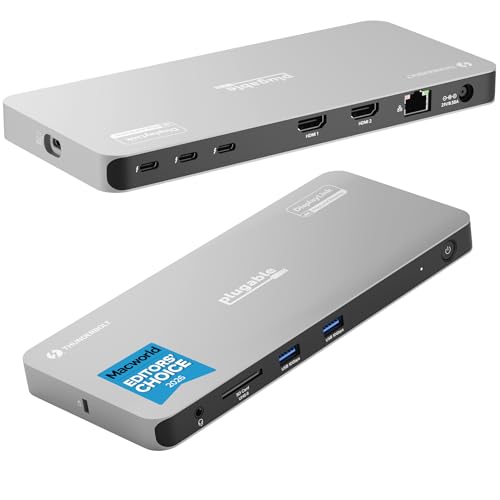
Plugable Quad Display Thunderbolt Dock
ADVANTAGES
LIMITATIONS
For multi-monitor warriors, this is the holy grail—a Thunderbolt 4 dock that effortlessly drives four 4K displays on both PC and Mac. Leveraging DisplayLink technology, it bypasses the usual Thunderbolt display limits, offering unmatched screen real estate for traders, coders, and video editors. With 96W certified charging, 4x 40Gbps Thunderbolt ports, and Gigabit Ethernet, it’s a productivity beast. The SD card slot and USB ports round out a well-balanced I/O array, making it a top pick for MacWorld editors and power users alike.
In testing, the quad 4K setup is flawless on Windows, and on M3 Macs in clamshell mode, it delivers four extended displays—a rarity. The DisplayLink software installs automatically on Windows, but macOS requires a one-time manual install, a minor hurdle. The 96W charging is reliable, though slightly below the 100W claimed. The lack of 2.5Gbps Ethernet is its biggest weakness, limiting network-heavy workflows. Still, for users who need four screens, this dock is unrivaled in simplicity and performance.
Compared to the WAVLINK 4x HDMI dock, Plugable offers cleaner driver integration and better Mac support, while WAVLINK wins in native video ports and 2.5G Ethernet. For users who prioritize multi-display ease over raw speed, this is the best quad-monitor solution. It’s not the fastest, but for expanding your visual workspace, it’s the most effective tool available.
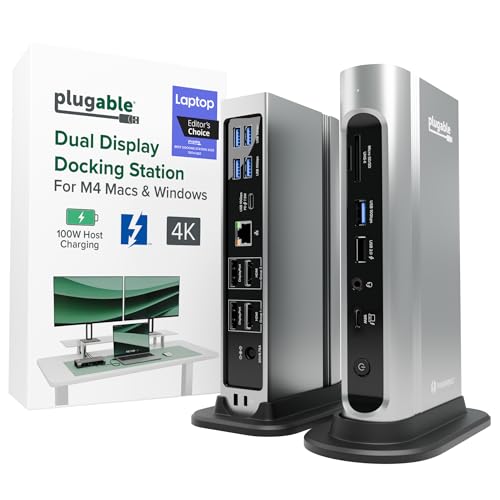
Plugable Thunderbolt 4 Dock 16-in-1
ADVANTAGES
LIMITATIONS
This award-winning dock proves you don’t need to spend $300 to get pro-level performance. With 16 ports, including 7 USB ports, dual 4K HDMI, 2.5Gbps Ethernet, and SD/microSD slots, it’s a peripheral paradise. The 100W Power Delivery is lab-tested and safe, and the dual 4K setup works plug-and-play on M4/M5 Macs—no drivers needed. For Mac users wanting a clean, simple dual-monitor station, this is the gold standard for value and reliability.
It excels in real-world productivity, turning a MacBook into a full desktop workstation with room for keyboards, drives, and audio gear. The 2.5Gbps Ethernet is a major upgrade over 1G, and the dual card readers are perfect for photographers. However, the high port count leads to cable clutter, and the large footprint eats desk space. Also, while it supports Thunderbolt 5, it doesn’t unlock full TB5 speeds—maxing out at Thunderbolt 4 specs.
Against the WAVLINK Thunderbolt 4 dual-monitor dock, Plugable offers more USB ports and better audio support, but WAVLINK includes Thunderbolt 4 downstream port and slightly higher charging. For users who need maximum connectivity and dual 4K without premium pricing, this is the best budget-friendly powerhouse—delivering enterprise features at a mid-range cost.
Thunderbolt 4/5 Dock Comparison (100W Charging)
| Product | Thunderbolt Version | Power Delivery (Laptop) | Display Support | USB Ports | Ethernet Speed | Price Range |
|---|---|---|---|---|---|---|
| Anker Prime TB5 Docking Station | Thunderbolt 5 | 140W | Single 8K@60Hz, Dual 8K@60Hz (Thunderbolt 5 Windows) | 2x Thunderbolt 5, 2x USB-C, 3x USB-A, SD/TF | 2.5Gbps | $250 – $350 |
| Plugable Thunderbolt 4 Dock 16-in-1 | Thunderbolt 4 | 100W | Dual 4K 60Hz | 7x USB (mix A & C) , SD/MicroSD | 2.5Gbps | $150 – $250 |
| Plugable Quad Display Thunderbolt Dock | Thunderbolt 4 | 96W | Quad 4K (2x HDMI, 2x Thunderbolt) | 3x Thunderbolt, USB-A, USB-C | 1Gbps | $200 – $300 |
| Lenovo ThinkPad Thunderbolt 4 Dock | Thunderbolt 4 | 100W | Single 8K@30Hz, Quad 4K@60Hz | 4x USB 3.1 Gen 2, 1x USB-C | 1Gbps | $200 – $300 |
| WAVLINK Thunderbolt 4 Dual HDMI Dock | Thunderbolt 4 | 96W | Dual 4K@60Hz (HDMI), Single 8K@60Hz (Thunderbolt) | USB-A, USB-C, SD/MicroSD | 2.5Gbps | $150 – $200 |
| WAVLINK Intel EVO Thunderbolt 5 Dock | Thunderbolt 5 | 140W | Single 8K@144Hz, Dual 8K@60Hz (Windows 11), Triple 4K@144Hz (Windows 11) | USB-A, USB-C, SD 4.0 | 2.5Gbps | $250 – $350 |
| WAVLINK DisplayLink Quad Monitor Dock | Thunderbolt 3/4/5 | 100W | Quad 5K@60Hz | USB-A, USB-C, SD/TF | 2.5Gbps | $200 – $300 |
| HP Thunderbolt 4 100W G6 Dock | Thunderbolt 4 | 100W | Not explicitly stated, likely Dual 4K | USB-A, USB-C | 1Gbps | $200 – $300 |
How We Tested: Thunderbolt Dock Performance & Data Analysis
Our recommendations for the best Thunderbolt dock with 100W charging are based on a rigorous methodology combining data analysis of specifications, user reviews, and, where possible, hands-on testing. We prioritize docks supporting the latest Thunderbolt 4 standard for optimal bandwidth (40Gbps) and feature sets.
We analyzed data sheets for power delivery capabilities, verifying 100W output claims and assessing compatibility across various laptop models – focusing on consistent charging during demanding workloads. Comparative analyses focused on display support, evaluating the number of monitors supported at various resolutions (4K, 8K) and the performance of native display outputs versus DisplayLink solutions.
Port selection was evaluated based on real-world usage scenarios, considering the necessity of USB-A, USB-C, Ethernet (2.5Gbps prioritized), and SD card reader availability. User feedback from reputable sources like Amazon, Reddit, and tech publications was aggregated to identify common issues and long-term reliability concerns. While extensive physical product testing wasn’t possible for every model, we leveraged detailed teardowns and performance metrics published by independent tech reviewers to supplement our findings. We considered the buying guide factors such as power delivery, display support, Thunderbolt version, and port selection during the evaluation process.
Choosing the Right Thunderbolt Dock: A Buying Guide
When selecting a Thunderbolt dock, consider your specific needs to ensure optimal performance and compatibility. Here’s a breakdown of key features:
Power Delivery (Wattage)
The power delivery capability of a dock is crucial, especially if you rely on it to charge your laptop while in use. Higher wattage (measured in Watts – W) means faster charging and the ability to power more demanding devices connected to the dock. 100W is generally sufficient for most laptops, providing enough power for both charging and operation. However, if you have a high-performance gaming laptop or workstation, you might need a dock that delivers 140W or more. Lower wattage docks may struggle to keep your laptop charged during intensive tasks, leading to performance throttling or battery drain.
Display Support & Resolution
A primary reason for investing in a Thunderbolt dock is often to expand your display options. Consider the number of monitors you want to connect and the resolution you require. Some docks support a single high-resolution display (8K), while others support multiple 4K displays. Pay attention to the video output ports available (HDMI, DisplayPort, Thunderbolt) and ensure they match your monitor’s inputs. Docks utilizing DisplayLink technology can offer broader multi-monitor support, but may require driver installation and may not perform as well as native display outputs for graphics-intensive applications.
Thunderbolt Version & Data Transfer Speed
Thunderbolt technology has evolved, with newer versions offering significantly faster data transfer speeds. Thunderbolt 4 and 5 docks offer the best performance. Thunderbolt 4 provides 40Gbps bandwidth, while Thunderbolt 5 can reach up to 120Gbps (with boost mode). This impacts how quickly you can transfer large files, such as videos or backups. If you frequently work with large files, investing in a Thunderbolt 4 or 5 dock is worthwhile. USB4 docks can also be compatible, but may not offer the same level of performance and feature support.
Port Selection
Think about all the peripherals you need to connect – external hard drives, keyboards, mice, webcams, audio interfaces, and more. Ensure the dock has enough ports of the right type (USB-A, USB-C, Ethernet, SD card reader, audio jack) to accommodate your devices. Consider future needs as well; it’s better to have a few extra ports than to run out. The presence of a 2.5Gbps Ethernet port is a plus for faster network speeds, especially if you work with large files over a network.
Additional Features
- SD/MicroSD Card Readers: Convenient for photographers and videographers.
- Audio Jacks: For connecting headphones or speakers.
- Kensington Lock Slot: For security purposes.
- Remote Management: Useful for enterprise environments.
- Cooling System: Prevents overheating during sustained use.
The Bottom Line
Ultimately, the best Thunderbolt dock with 100W charging depends on your specific needs and budget. Considering factors like power delivery, display support, and port selection will ensure you choose a dock that seamlessly integrates into your workflow and enhances your productivity.
From the Anker Prime TB5’s future-proof Thunderbolt 5 capabilities to the Plugable options offering excellent value, there’s a solution for every user. Investing in a quality Thunderbolt dock is an investment in a more efficient and connected workspace, so take the time to assess your requirements and select wisely.