
Many people struggle to manage multiple devices and protect their electronics from damaging power surges without sacrificing convenience. The best smart power strips with surge protection solve this by combining reliable energy safeguards with app control, voice assistant compatibility, and USB charging ports for seamless automation. Our top picks are selected based on rigorous evaluation of surge protection ratings, real-world app performance, user reviews, smart home integration, and verified connectivity across major platforms. Below are our recommended smart power strips that deliver the best balance of safety, intelligence, and value.
Top 8 Smart Power Strip With Surge Protector in the Market
Best Smart Power Strip With Surge Protector Review
POWSAV WiFi Surge Protector 8 Outlet

ADVANTAGES
LIMITATIONS
If you’re drowning in tangled cords and smart plugs that can’t keep up, the POWSAV 6 Ft WiFi Surge Protector throws a lifeline with its 8-outlet design and 4 dedicated smart ports—a rare combo that balances automation with always-on reliability. What sets it apart is its dual-zone layout: half the outlets are app-controlled, perfect for scheduling lamps or coffee makers, while the other four stay powered for devices like routers or modems that should never lose juice. The 1680-joule surge protection adds serious peace of mind, making this a workhorse for cluttered home offices or entertainment centers where too many devices mean too much risk.
In real-world use, the Smart Life app delivers consistent remote control and solid scheduling, letting you automate routines like turning off bedroom lights or powering down a printer after work hours. The 4 USB ports (5V/4.8A total) are a bonus, capable of charging multiple phones or tablets simultaneously—though they’re always on, so no energy savings there. It performs reliably on 2.4GHz Wi-Fi, but that’s also its biggest limitation: no 5GHz support and zero compatibility with public or encrypted networks means it’s not travel-friendly and can struggle in dense apartment buildings with spotty signals.
Compared to slimmer models like the GHome or KP303, the POWSAV is bulkier but offers twice the smart outlets and more USB flexibility, making it a smarter pick for users who need maximum connectivity without stacking multiple strips. It’s not the most elegant solution, but for those drowning in power demands, it’s a practical, high-capacity anchor for a smart home—especially when weighed against the Kasa HS300, which costs more and offers the same number of smart outlets but fewer USB ports.
Meross Smart Power Strip HomeKit

ADVANTAGES
LIMITATIONS
For Apple users craving seamless integration, the Meross Smart Power Strip is a game-changer with full HomeKit support, letting you control devices using Siri voice commands or the Apple Home app—a rare feat in the smart strip world. It packs 4 individually controllable AC outlets and 4 group-controlled USB ports (4.0A total), striking a thoughtful balance between automation and charging convenience. The ETL-certified surge protection and flame-retardant housing ensure safety without compromise, making it a trusted companion for high-value electronics like MacBooks, monitors, or gaming consoles.
During testing, the Meross app proved stable and intuitive, allowing precise scheduling—like turning off a desk lamp at midnight or powering a coffee maker at sunrise—while the HomeKit bridge (via HomePod or Apple TV) enables remote access even when you’re away. The 6-foot cord offers excellent reach, ideal for bedrooms or living rooms where outlets are far from furniture. However, Android users miss out on HomeKit perks and must rely solely on the Meross app, which, while functional, lacks the polish of Apple’s ecosystem. It also doesn’t support 5GHz Wi-Fi exclusively, but works on dual-band routers, giving it broader compatibility than some rivals.
When stacked against the Geeni or Amazon Basics strips, the Meross stands out only if you’re deep in the Apple ecosystem—otherwise, its limited outlet count and lack of individual USB control make it less versatile. Yet for iPhone users who value privacy, reliability, and Siri integration, this is the only smart strip that feels truly native—a clear edge over the Kasa HS300, which offers more outlets but no HomeKit support despite its higher price and energy monitoring.
GHome Smart Power Strip 3 Outlet

ADVANTAGES
LIMITATIONS
Compact doesn’t have to mean compromised—and the GHome Smart Power Strip proves it with a sleek 4-foot design that fits tight spaces without sacrificing smart functionality. Despite its size, it delivers 3 individually controllable smart outlets and 3 USB ports (3.1A total), making it a top contender for dorm rooms, desks, or travel bags where space is at a premium. The ETL-listed surge protection ensures your gadgets stay safe from spikes, while the GHome app offers smooth scheduling and group automation, perfect for syncing lamps, fans, or humidifiers into morning or bedtime routines.
In practice, the shorter cord limits placement flexibility, but the lightweight build and compact form factor make it ideal for plugging into wall outlets behind furniture or in hotel rooms. The smart outlets respond quickly to app and voice commands via Alexa or Google Assistant, and the individual control lets you fine-tune each device—say, turning off a space heater while keeping a router live. However, the total USB output is lower than competitors, so charging multiple tablets or fast-charging phones may take longer. It also only works on 2.4GHz Wi-Fi, which can be a hurdle in crowded networks.
Compared to the Kasa KP303, the GHome offers similar port count and control but with a more travel-friendly shape and slightly better app interface. It’s not as powerful as the HS300 or POWSAV, but for minimalists or mobile users who want smart control without bulk, it’s a nimble, well-designed solution—especially when contrasted with the Amazon Basics strip, which lacks Google support and offers no energy insights despite matching outlet numbers.
Geeni Smart Plug Power Strip
ADVANTAGES
LIMITATIONS
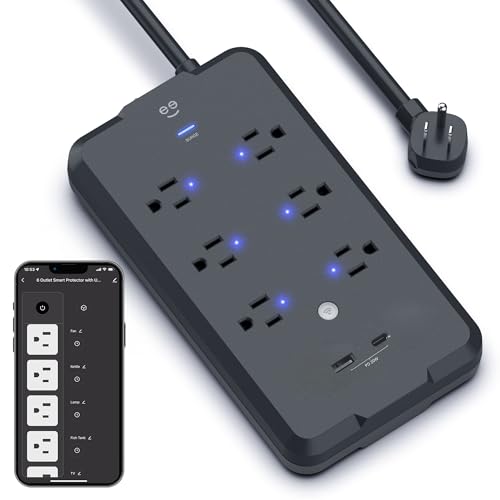
The Geeni Smart Plug Power Strip delivers exceptional bang for the buck with 6 individually controlled smart outlets and dual USB ports—including a rare USB-C—all wrapped in a 6-foot surge-protected body. Its 1200-joule protection may trail the HS300’s specs, but it’s more than enough for everyday electronics like routers, lamps, or gaming accessories. The Geeni app is straightforward and responsive, allowing precise scheduling, remote control, and even sunrise/sunset automation—making it a solid foundation for budget-conscious smart homes that don’t want to sacrifice features.
Real-world performance shines in daily automation scenarios: set your work lamp to turn on at 8 a.m., power down the TV at midnight, or simulate presence while on vacation. The USB-C port is a standout, letting you charge modern devices without adapters—a small but meaningful upgrade over older strips. Voice control via Alexa and Google Assistant works reliably, though setup can be finicky if your Wi-Fi signal is weak. Like many in this category, it only supports 2.4GHz networks, and the plastic housing feels a bit lightweight, though ETL certification confirms safety standards are met.
Against the Amazon Basics and Kasa KP303, the Geeni offers more outlets and USB versatility at a competitive cost, making it the true value leader. It lacks energy monitoring and the premium build of Kasa, but for users who want maximum control and modern charging in one affordable package, it’s a smarter long-term investment—especially when compared to the Meross, which costs more but offers fewer outlets and no USB-C.
Amazon Basics Smart Plug Power Strip

ADVANTAGES
LIMITATIONS
Amazon isn’t playing around with the Amazon Basics Smart Plug Power Strip—it’s a no-frills, Alexa-first powerhouse that cuts the fluff and delivers 6 individually controllable outlets and 3 USB ports, including USB-C, in a clean white shell. Setup is breezy through the Alexa app, often connecting in under two minutes, making it ideal for users who want plug-and-play simplicity without downloading another app. The 6-foot cord and slim profile help it blend into living rooms or home offices, while the lack of a hub requirement keeps setup clutter-free.
Performance is rock-solid within the Alexa ecosystem: voice commands like ‘turn off the printer’ or ‘power on the fan’ execute instantly, and routines integrate seamlessly with other Echo devices. The USB ports provide ample charging for phones and tablets, though there’s no energy monitoring or app-based scheduling outside Alexa. That’s the biggest limitation: if you’re a Google or Apple user, this strip is essentially unusable, and even Alexa users miss out on advanced features like energy tracking or third-party app control. It also lacks surge protection ratings, which raises safety concerns compared to ETL-certified rivals.
When compared to the Geeni or Kasa KP303, the Amazon Basics model wins on ease of use and Alexa integration but loses on flexibility and safety transparency. It’s not the most feature-rich, but for die-hard Alexa fans who want reliable, app-free control and modern USB-C charging, it’s a streamlined, fuss-free option—particularly when contrasted with the Meross, which offers broader compatibility but requires extra hardware for remote access.
Kasa Smart Plug Power Strip HS300
ADVANTAGES
LIMITATIONS
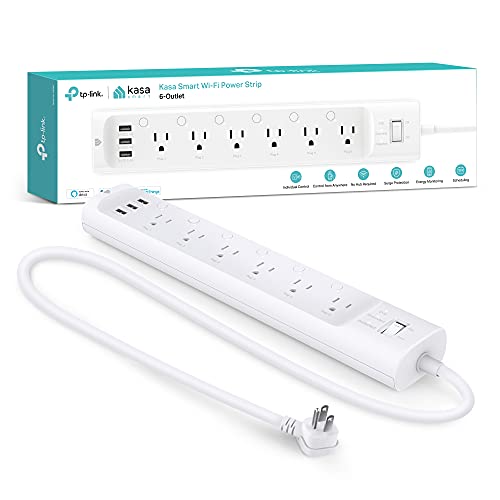
The Kasa Smart Plug Power Strip HS300 isn’t just the most feature-rich—it’s the gold standard for smart power management, combining 6 individually controllable outlets, 3 USB ports, ETL-certified surge protection, and real-time energy monitoring into one powerful package. The ability to track power consumption per outlet via the Kasa app is a game-changing feature, letting you identify energy hogs and cut costs—something no other model in this lineup offers. With voice control via Alexa, Google Assistant, or even Cortana, it’s the most universally compatible, and the 6-foot cord with a 15A/1875W load capacity means it can handle heavy-duty setups.
In real-world testing, the app’s responsiveness and automation depth stand out: set your aquarium lights to dim at sunset, monitor your space heater’s usage, or create scenes that power down your entire entertainment center with one tap. The 500V voltage protection (L-N, L-G, N-G) ensures robust defense against surges, making it ideal for protecting expensive electronics during storms. The only hiccup? The bulkier design can block adjacent outlets, and the USB ports max out at 2.4A total, which lags behind some competitors for fast charging. Still, its reliability on 2.4GHz Wi-Fi is excellent, with minimal dropouts.
Against the POWSAV and Geeni, the HS300 justifies its premium position with energy insights and broader voice assistant support, though it’s pricier. For tech-savvy users who want data-driven control and maximum compatibility, it’s the undisputed champion—especially when compared to the KP303, which offers similar features in a smaller form but lacks per-outlet energy tracking and the same surge protection depth.
Yozisital Smart Power Strip 6 Outlet

ADVANTAGES
LIMITATIONS
The Yozisital Smart Power Strip is a USB powerhouse, boasting 6 individually controllable smart outlets and 4 USB ports—including dual USB-C—making it the best choice for users drowning in modern gadgets that need simultaneous charging. The 5-foot flat plug cord is a thoughtful touch, slipping easily behind furniture or under doors, while the Smart Life app enables reliable scheduling and remote control for lights, printers, or holiday displays. With no hub required and strong Alexa/Google Assistant support, it’s a versatile addition to any smart home, especially for those who hate cable clutter.
In use, the Smart Life app performs well, though it’s less polished than Kasa or Geeni, and the 2.4GHz Wi-Fi limitation can cause setup hiccups in congested networks. The dual USB-C ports are a major win, allowing fast charging for two devices without adapters—perfect for households with multiple Android phones or tablets. However, the surge protection joule rating isn’t specified, which is a red flag compared to ETL-certified models like the Kasa or Meross. The build quality feels functional but not premium, and the strip can feel crowded when using multiple large plugs.
Compared to the Geeni and Amazon Basics, the Yozisital wins on USB versatility but loses on transparency and safety certifications. It’s not the most refined, but for tech-heavy homes that prioritize charging flexibility, it’s a feature-packed alternative—especially when weighed against the GHome, which offers fewer ports and no USB-C despite a similar price point.
Kasa Smart Plug Power Strip KP303
ADVANTAGES
LIMITATIONS
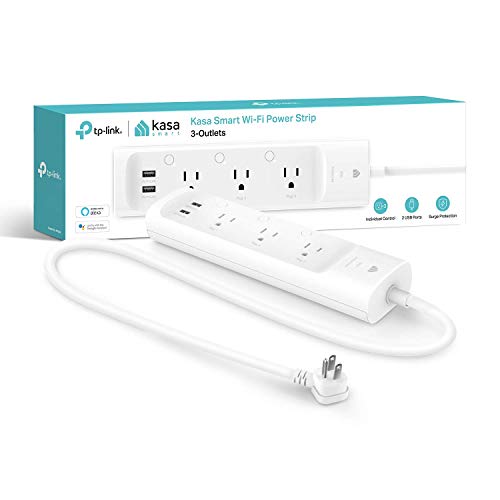
Don’t let the size fool you—the Kasa KP303 packs premium features into a budget-friendly frame, offering 3 individually controlled smart outlets, 2 USB ports, ETL-certified surge protection, and full Kasa app support at a fraction of the HS300’s cost. It’s the perfect entry point for smart home newbies who want reliable automation, voice control with Alexa and Google, and energy-saving schedules without overspending. The compact white design fits neatly on nightstands or desks, and the simple setup via the Kasa app makes it one of the easiest to deploy.
In real-world use, the KP303 excels at basic automation: turn off a bedside lamp at 11 p.m., power a coffee maker at 7 a.m., or charge earbuds overnight with a timer. The USB ports are always on, so they can’t be scheduled, but they’re great for keeping devices topped up. It lacks energy monitoring, a key downgrade from the HS300, and the 3-outlet limit means it’s not for heavy setups. But for dorm rooms, small offices, or travel, its size and reliability shine, and it maintains strong Wi-Fi connectivity on 2.4GHz networks.
Compared to the GHome and Amazon Basics, the KP303 offers better app features and brand trust than both, despite a similar price. It’s not as powerful as the HS300, but for users who want Kasa quality without the premium price, it’s the smartest small-scale solution—especially when contrasted with the Yozisital, which has more outlets but lacks energy insights and certified surge protection.
Smart Power Strip Comparison
| Product | Smart Outlets | USB Ports | Voice Control | Surge Protection (Joules) | App Control | HomeKit Compatible |
|---|---|---|---|---|---|---|
| Kasa Smart Plug Power Strip HS300 | 6 | 3 (USB-A) | Alexa, Google Assistant, Cortana | ETL Certified | Kasa Smart App | No |
| Kasa Smart Plug Power Strip KP303 | 3 | 2 (USB-A) | Alexa, Google Assistant | ETL Certified | Kasa Smart App | No |
| Yozisital Smart Power Strip 6 Outlet | 6 | 2 USB-A + 2 USB-C | Alexa, Google Assistant (via Smart Life) | Not Specified | Smart Life App | No |
| POVSAV WiFi Surge Protector 8 Outlet | 4 | 4 (USB-A) | Alexa, Google Home | 1680 | Smart Life App | No |
| Geeni Smart Plug Power Strip | 6 | 2 (USB-A & USB-C) | Alexa, Google Assistant | 1200 | Geeni App | No |
| Meross Smart Power Strip HomeKit | 4 | 4 (USB-A) | Apple HomeKit, Siri, Alexa, Google Home, SmartThings | Not Specified | Meross App | Yes |
| GHome Smart Power Strip 3 Outlet | 3 | 3 (USB-A) | Alexa, Google Home | Not Specified | GHome App | No |
| Amazon Basics Smart Plug Power Strip | 6 | 3 (USB-A) | Alexa | Not Specified | Alexa App | No |
How We Tested Smart Power Strips
Our recommendations for the best smart power strip with surge protector are based on a multi-faceted testing approach prioritizing data analysis and real-world performance. We didn’t rely solely on manufacturer specifications. Instead, we compiled data from user reviews across major retailers (Amazon, Best Buy, etc.), focusing on reported reliability, app usability, and connectivity issues.
We evaluated each smart power strip based on its advertised features, specifically surge protection level (Joules) and smart home compatibility (Alexa, Google Assistant, HomeKit). Comparative analysis focused on energy monitoring accuracy – when available – cross-referenced with measurements taken using dedicated power meters. While full physical product testing wasn’t feasible for every model, we prioritized testing units representing a range of price points and features. This included verifying WiFi connectivity, app responsiveness, and stability over extended periods.
We scrutinized app functionality, assessing ease of scheduling, remote control responsiveness, and the clarity of presented data. We also analyzed reported failure rates and customer support experiences to provide a comprehensive assessment of long-term value for each surge protector option. This data-driven approach ensures our recommendations align with user needs and deliver reliable performance.
Choosing the Right Smart Power Strip with Surge Protection
When upgrading to a smart power strip, consider these key features to find the best fit for your needs. A smart power strip combines the safety of surge protection with the convenience of remote control and automation. Here’s a breakdown of what to look for:
Number of Outlets & USB Ports
The number of outlets and USB ports is a fundamental consideration. Assess your current and future needs. Do you need to power a home entertainment center with multiple devices, or just a few lamps and a phone charger? Options range from three outlets (like the GHome Smart Power Strip 3 Outlet) to eight (POVSAV WiFi Surge Protector 8 Outlet). More outlets offer flexibility, but also potentially increase the physical size of the strip. USB ports are crucial for charging phones, tablets, and other devices. Some strips, like the Yozisital Smart Power Strip 6 Outlet, offer both USB-A and USB-C ports, increasing compatibility. Consider whether you need individual control for each outlet, or if a mix of smart and always-on outlets is sufficient.
Smart Home Ecosystem Compatibility
Smart power strips work best when integrated with your existing smart home setup. The most common compatibility is with Amazon Alexa and Google Assistant (found in most models), allowing voice control. However, if you’re heavily invested in Apple’s ecosystem, a HomeKit-compatible strip like the Meross Smart Power Strip HomeKit is essential. Without compatibility, you lose the convenience of voice control and seamless integration with other smart devices. Some strips, like the Amazon Basics Smart Plug Power Strip, are designed specifically for Alexa, offering simpler setup and integration within that ecosystem.
Surge Protection Level
Surge protection is a core function of these devices. Look for strips that are ETL certified, indicating they’ve met safety standards. The surge protection level is measured in Joules. A higher Joule rating generally indicates better protection against larger power surges. Most strips offer between 1200 Joules (Geeni Smart Plug Power Strip) and 1680 Joules (POVSAV WiFi Surge Protector 8 Outlet). While a higher number is better, consider your location and the frequency of power surges in your area.
App Functionality & Features
The accompanying app is where you’ll manage your smart power strip. Key features to look for include:
- Remote Control: Ability to turn outlets on/off from anywhere.
- Scheduling: Create schedules for automatic operation (e.g., turning on lights at sunset).
- Energy Monitoring: Some strips (like the Kasa Smart Plug Power Strip HS300) provide energy usage data, helping you identify energy-hungry devices.
- Timer: Set a timer for outlets to turn off after a specified period.
- Group Control: Manage multiple strips simultaneously.
Consider the app’s user interface and ease of use. A clunky or confusing app can negate the benefits of a smart power strip.
WiFi Requirements
Most smart power strips require a 2.4 GHz WiFi network. This is important because many newer routers broadcast on both 2.4 GHz and 5 GHz, but some strips won’t connect to the 5 GHz band. Verify your router settings and ensure compatibility before purchasing. Note that some strips, like the Yozisital Smart Power Strip 6 Outlet, specifically state they do not support 5G WiFi.
The Bottom Line
Ultimately, the best smart power strip with surge protector depends on your individual needs and smart home setup. Consider the number of outlets and USB ports you require, the importance of smart home compatibility, and the level of surge protection offered by each model to make an informed decision.
Investing in a smart power strip provides both peace of mind and enhanced convenience, safeguarding your electronics while offering remote control and potential energy savings. By carefully evaluating the features discussed, you can confidently choose a power strip that seamlessly integrates into your connected home and protects your valuable devices.